TiviMate IPTV Player
- 4.0
- Rating
- 5.00M
- Installs
- Free
- Price

 Analysis by App-foxy
I found TiviMate Player most useful when I treated it as a viewing tool for an IPTV service I already had, rather than as a source of channels by itself. That distinction matters from the first screen: the app is a video player for IPTV, so the quality of the experience depends heavily on having a legitimate, correctly configured service to connect to it. Once that relationship is clear, the app feels more focused than a general video player. It is designed around organizing and watching IPTV content, not around editing clips, browsing local media, or replacing every streaming app on a phone.
Developed by Armobsoft FZE, it is a free app in the Video Players & Editors category and is suitable for Everyone. Its current version is 5.2.0, and it runs on Android 6.0 or later. The app has built a sizeable audience, with over a million installs and an average rating of 4.2 from around 7.5 thousand ratings. Those figures suggest a mature, familiar option for IPTV viewers, although popularity does not remove the need for careful setup.
What makes TiviMate Player useful, and where people get stuck
My first impression was that the main value is not simply playing a stream. Many IPTV services can open a channel in a basic player, but a dedicated IPTV interface gives the content a more television-like home. That is particularly helpful when a provider supplies a large channel list or an electronic program guide. Instead of repeatedly entering a stream address or searching through an unstructured list, I can approach the service as a collection of channels that needs browsing and organization.
You May Also Like

 Blood Strike: 2.5 Anniversary
Blood Strike’s Loadouts Turn Every Drop Into a Tactical Gamble
A close look at Blood Strike’s custom loadouts: how fast access to signature weapons reshapes its battle royale rhythm, rewards preparation, and narrows the gap between fights.

 Pandora - Music & Podcasts
Pandora’s Music Is Easy to Start, but Harder to Recover
Pandora’s strength is its low-effort path from a seed to a station. Its weak spot is how much confidence it asks you to place in connection, setup, and quiet recovery.

 8 Ball Pool
 Is Built on Rivalries, Rematches, and Routine
A close look at the rivalries, rematches, shared routines, and unanswered safety questions that turn a quick pool match into a persistent mobile community.

 Samsung Music
’s Quiet Strength Is Playing What You Already Own
Its reach comes less from spectacle than from dependable access to a personal library. That simplicity is both the app’s strongest retention engine and its ceiling.

 AccuWeather: Weather Radar
AccuWeather Review: A Quick, Clear Forecast for Everyday Decisions
For everyday plans, the best forecast is the one you can understand quickly. AccuWeather makes rain timing, radar, and local conditions easy to act on, with a few trade-offs.

 Hill Climb Racing
Why Hill Climb Racing Still Turns Crashes Into One More Run
A tiny car, a bumpy hill and one more upgrade: Hill Climb Racing keeps resurfacing because its simple chaos makes every near-miss feel personal.
More From Our News Desk



The most common point of confusion is the boundary between the app and the IPTV provider. TiviMate Player does not magically supply television programming just because it is installed. A user still needs valid service details, and those details must be entered in the format the provider expects. If the channel list is empty, the guide is missing, or playback fails immediately, the first question should be whether the account information and service are working, not whether the player is broken.
That sounds obvious, but it changes troubleshooting completely. People often reinstall the app, clear settings, or switch devices before checking whether the subscription is active, whether the login was copied accurately, or whether the provider has issued a new address. A player can only display the information it receives. In my experience, separating “the app cannot connect” from “the service is not delivering content” saves more time than almost any interface adjustment.
Another friction point is entering long credentials with a remote control. On a television, typing a server address, username, and password character by character is slow and easy to get wrong. A single extra space, a missing symbol, or a confusing uppercase letter can prevent the connection. I recommend preparing the details in a readable note first and checking every part before pressing save. If the provider offers more than one connection method, I would use the one it specifically recommends for this player instead of guessing.
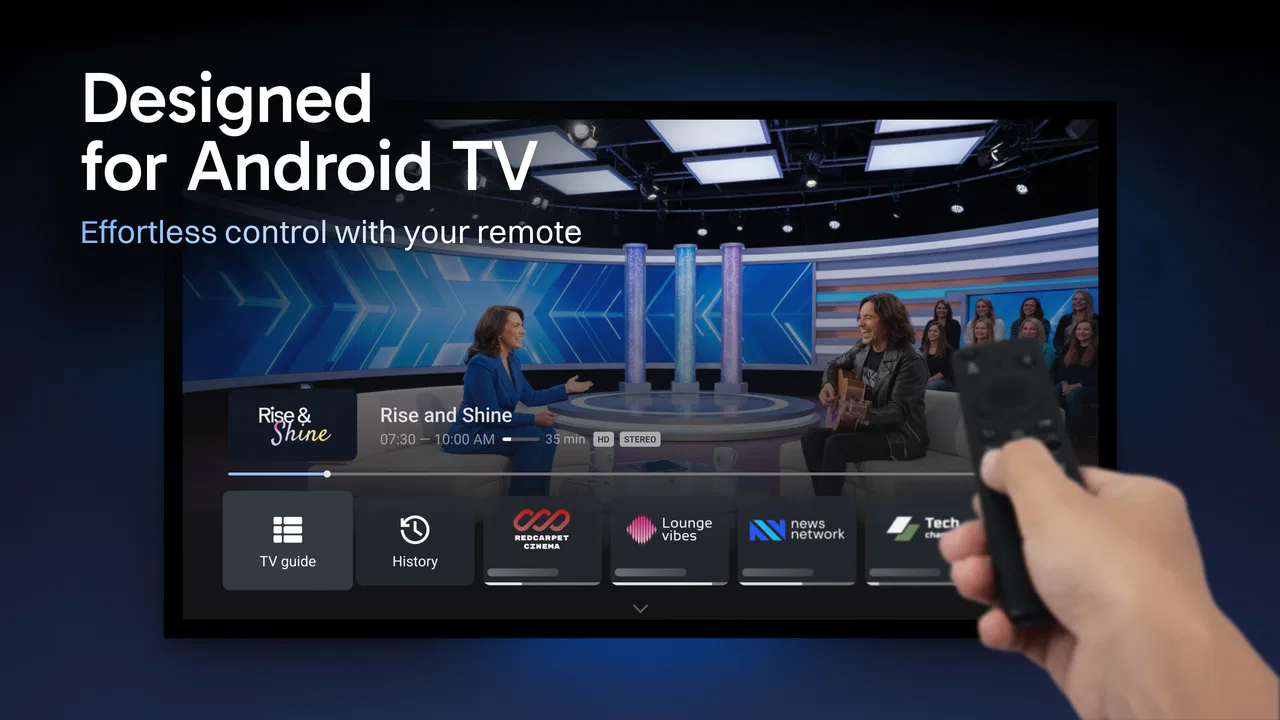
The app is a better fit for a television-oriented setup than for someone who only wants to tap a video on a phone. Its purpose becomes clearer when the screen is used from a sofa, with a remote or another simple control method. On a small display, the extra IPTV organization may feel less important, while a lightweight player or the provider’s own mobile app may be quicker for occasional viewing.
Start with the service details, not the visual settings
Before changing anything, I would confirm four basics: the account is active, the address belongs to the intended provider, the username and password are exact, and the device has a stable internet connection. These checks sound routine, but they cover most failed first attempts. If the provider has sent setup instructions, following those instructions literally is safer than adapting details from a random guide written for another IPTV application.
It is also worth checking whether the provider has separate information for live channels, program data, or other parts of the service. I would not assume that every address is interchangeable. If live video appears but the program guide does not, that may be a configuration mismatch rather than a playback defect. Conversely, if the guide loads but every channel fails, the service may be reachable while the actual stream access is not working.
When the list does load, I prefer to test several kinds of content before deciding that everything is fine. One channel may be temporarily unavailable while others work normally. Testing a few entries helps distinguish a single provider-side problem from a general setup failure. I also look at whether the issue affects live playback only or whether the guide and channel list are affected too. That simple comparison gives a useful direction without requiring technical tools.
For a household setup, I would do the initial configuration when I have time to read each screen carefully. IPTV lists can be large, and a rushed setup can make the app appear confusing simply because the source contains more channels than expected. Once the connection is established, I would spend a few minutes identifying the channels I actually use. A shorter, more familiar list is easier to navigate than treating every available entry as equally important.
This is one of the less obvious benefits of using a dedicated player: the app can become a front door to a service instead of a raw collection of addresses. The trade-off is that the first setup requires more attention than opening a conventional streaming application. If you expect an instant catalog with no account details, TiviMate Player may feel unnecessarily complicated.
Recovering a broken workflow without making it worse
When playback stops working, I avoid changing several things at once. My usual recovery sequence is simple: leave the channel, try another channel, check whether the internet works elsewhere, reopen the app, and then review the provider details. This order matters because it preserves clues. If I immediately delete the playlist or reset every setting, I may remove useful information about what was working before.
If only one channel fails, I would treat that differently from a complete failure. A single broken stream can be a source problem, while a whole list disappearing points more strongly toward credentials, connectivity, or an expired service. If the channel list itself vanishes after an update or restart, I would first check whether the configured source is still present before assuming that the application has lost all functionality.
Re-entering details can help when copied text contains an invisible space or a character that was misread. I would type carefully, save the configuration, and test again. If the provider uses temporary or changing access information, I would ask the provider for current instructions rather than searching for unofficial replacement details. That is both safer and more reliable than trying random addresses.
Restarting the device is also reasonable when the app behaves inconsistently, especially after the network has changed. I would keep that step proportionate, though. A restart can clear a temporary connection problem, but it cannot repair an inactive account or a stream that the provider is no longer serving. Likewise, reinstalling should be a later step, because it can remove local configuration and create more work if the original details are not readily available.
There is a practical lesson here: recovery should be reversible whenever possible. Testing another channel is reversible. Checking the network is reversible. Deleting the setup is not. I prefer to preserve the existing arrangement until I understand the failure. This approach is especially useful for family devices, where a “quick fix” can leave everyone without access and no one remembers the original settings.
Knowing when the app is not the cause
IPTV playback involves several links: the device, the home network, the provider’s service, the stream itself, and the player. TiviMate Player is only one part of that chain. If video buffers across multiple channels while other internet services are also slow, I would investigate the connection first. If other apps work normally but one provider’s channels fail, I would look more closely at that provider.
Timing can also reveal the source of a problem. If playback works at one time and fails later, the issue may be temporary service congestion or a provider-side interruption. If the same channel fails everywhere but other channels continue, the problem is unlikely to be solved by changing the player. I would record what works and what does not before contacting support, because a precise description is more useful than saying only that “IPTV is broken.”
The device itself can matter too. Older hardware may struggle with demanding video even when the network is healthy. Since the app supports Android 6.0 and later, compatibility with the operating system is one basic requirement, but compatible software does not guarantee identical performance on every device. If the app opens normally yet playback is unstable, I would compare another channel and, if possible, another device on the same service. That comparison helps separate hardware limitations from account or network faults.
I also would not judge the app solely by a provider’s channel quality. A player can present a clean interface while the source sends low-quality video, inconsistent metadata, or unreliable program information. If the guide contains incorrect titles or times, the provider may be supplying poor guide data. The player can organize that information, but it cannot make incomplete source data accurate.
This is where TiviMate Player differs from a typical subscription streaming app. Services such as mainstream video platforms usually control the catalog, account system, delivery network, and playback experience in one package. With an IPTV player, those responsibilities are divided. You gain flexibility in how a service is presented, but you also inherit more troubleshooting responsibility. For users who want everything managed in one official app, that extra layer may be a disadvantage.
Small habits that make daily viewing easier
After setup, I would avoid treating the entire channel list as my everyday interface. A large list can make the player feel slower and less personal even when it is functioning correctly. I find it more comfortable to identify the channels or categories I actually watch and use those as the starting point for normal viewing. This is not about adding more content; it is about reducing the number of decisions between opening the app and watching something.
I would also check the guide before relying on it for a planned program. Program information comes from the IPTV source, so it may be delayed, incomplete, or inconsistent with the actual broadcast. For casual browsing, that may be acceptable. For someone choosing the app specifically as a dependable replacement for a traditional television guide, it is worth testing the guide over several viewing sessions before making that assumption.
Another useful habit is to keep the provider’s setup message somewhere accessible. If the app needs to be configured again after a device change, having the original details prevents guesswork. I would store that information privately and avoid copying credentials into public forums or unofficial tools. The player is most convenient when the setup information is available but still handled carefully.
For shared homes, I would establish one person as the keeper of the configuration details. That avoids several family members changing the same settings while trying to solve different problems. It also makes it easier to tell whether a failure began after a configuration change. A simple note about the provider, the date of the last successful test, and the symptoms can be more useful than repeatedly experimenting.
There is also a trade-off between convenience and control. A dedicated player can feel more direct than switching among many provider apps, but it asks the user to understand the service behind it. I enjoy that control when I want one consistent viewing environment. I would not recommend it to someone who dislikes account setup, troubleshooting, or dealing with a provider separately from the playback software.
Who should use it and who should choose something else
I see TiviMate Player as a strong option for someone who already has a legitimate IPTV service and wants a focused way to browse and watch it, especially on a television. It makes the most sense for viewers who value a channel-based experience and are willing to spend time getting the source configured correctly. The free entry point makes it easy to try without committing money immediately, although optional in-app purchases range from under a dollar to nearly thirty-four dollars per item, so I would review any purchase screen carefully before confirming one.
The Everyone age rating also makes the app broadly accessible as software, but that should not be confused with the nature of the content delivered through an IPTV service. The player’s rating describes the application, while the channels and programs depend on the source connected to it. Parents should therefore evaluate the provider and the content separately instead of assuming that the app’s age label covers everything viewed through it.
I would skip it if I only needed to play videos stored on my phone, edit recordings, or watch a single official streaming service. In those cases, a standard media player, a video editing app, or the service’s own application will probably be simpler. I would also hesitate if I expected the player to include channels automatically. That expectation leads to disappointment because the app is a viewing interface, not a replacement for a content subscription or provider account.
Compared with a basic IPTV player, TiviMate Player is more appealing when organization and a television-style workflow matter. Compared with an official streaming app, it offers a different kind of flexibility but less of the all-in-one convenience. The right choice depends on whether I want control over how an existing IPTV service is presented or whether I prefer a polished catalog where the provider handles every technical layer.
My practical verdict after using the whole workflow
The real strength of TiviMate Player is the structure it adds around an IPTV service, not the promise of effortless television. When the provider details are correct and the source is dependable, it gives me a more natural way to browse channels than repeatedly opening individual streams. The experience becomes especially worthwhile on a larger screen, where a channel list and guide are easier to use from a distance.
Its main weakness is equally clear: the app cannot compensate for a poor service, incorrect credentials, unstable internet, or incomplete guide information. New users may blame the player for problems that originate elsewhere, while experienced users will appreciate that it keeps the viewing interface separate from the provider. That separation is both the reason to choose it and the reason setup can feel more involved.
Armobsoft FZE has positioned this as a dedicated IPTV player rather than a general-purpose video tool, and that focus works in its favor. The free price makes testing straightforward, while the current 5.2.0 release and broad Android compatibility make it accessible to many devices. I would approach it with realistic expectations: prepare the service information, test the connection methodically, preserve working settings during troubleshooting, and judge the provider separately from the player.
For my own recommendation, I would suggest it to a friend who already knows why they want IPTV and wants a cleaner daily viewing workflow. I would not suggest it as a first step for someone simply looking for free television or an effortless streaming catalog. If your service is legitimate and reliable, TiviMate Player can turn a messy collection of channels into a more manageable routine. If the source is unstable, no interface can fully rescue the experience.
FAQs for TiviMate IPTV Player
01What is TiviMate IPTV Player, and how does it work?
TiviMate IPTV Player is a powerful IPTV player that allows users to stream live TV channels on their Android devices. It is designed to work with IPTV services that provide M3U playlists and EPG guides. The app offers a user-friendly interface with features like multiple playlist support, scheduled recording, and a sleek electronic program guide (EPG) for easy navigation.
02Is TiviMate IPTV Player free to use, or does it require a subscription?
TiviMate IPTV Player offers a free version with basic features, but to unlock its full potential, a subscription to TiviMate Premium is recommended. The premium version provides additional functionalities such as catch-up, multiple playlist management, and advanced customization options. Users can choose between monthly or yearly subscription plans to suit their needs.
03Can I use TiviMate IPTV Player on iOS devices?
As of now, TiviMate IPTV Player is designed primarily for Android devices and does not offer an official version for iOS. Users with Android TV or Firestick can enjoy the app's full capabilities. iOS users will need to explore alternative IPTV players compatible with their devices for similar functionality.
04How do I add channels to TiviMate IPTV Player?
To add channels, users need an active IPTV subscription that provides an M3U playlist URL. Within TiviMate, navigate to the settings menu and select ‘Add Playlist.’ Enter the M3U URL provided by your IPTV service. Once added, the app will populate the channels and EPG, allowing you to start streaming immediately.
05What are the key features that make TiviMate IPTV Player stand out?
TiviMate IPTV Player stands out due to its intuitive interface, robust EPG support, and customization options. Key features include multi-view, allowing simultaneous channel viewing, catch-up for missed shows, and a customizable viewing experience. The app is designed for smooth navigation, making it a top choice for IPTV streaming enthusiasts.
Pros
- User-friendly interface
- easy to navigate.
- Supports multiple playlists seamlessly.
- Customizable viewing options available.
- Excellent EPG support for channel guides.
- Smooth streaming with minimal buffering.
Cons
- No built-in channels
- requires external sources.
- Premium features need a subscription.
- Limited compatibility with some devices.
- No official iOS version available.
- Initial setup can be time-consuming.

TiviMate IPTV Player
Gallery